
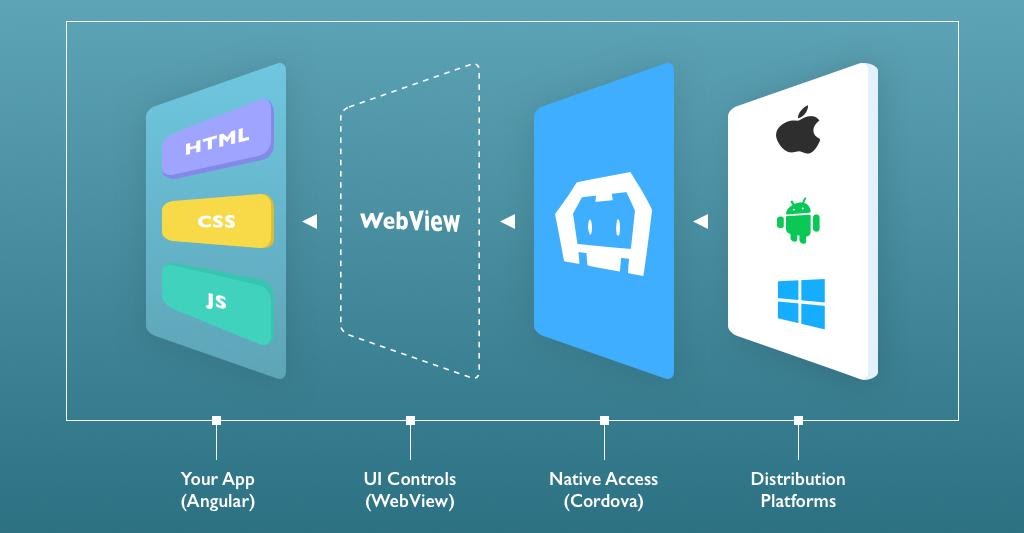
Ionic is an open-source framework that builds mobile apps, desktop apps, and progressive web applications. Ionic provides the open-source UI toolkit for building efficient and high-quality interactive applications using web technologies like HTML, CSS, and JavaScript. Ionic framework introduces the concept of “write once and run everywhere” which means we can create cross-platform hybrid applications using a single platform.
Before you go with the Ionic framework, let’s understand how it works and about the whole scenario of the application.
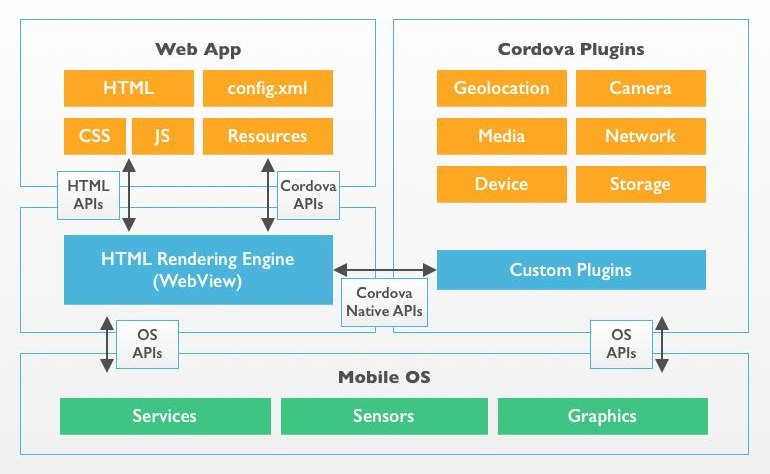
Actually, we don’t need the Ionic framework to develop a cross-platform hybrid app, Ionic is just like a front end framework like bootstrap, and it’s mainly focusing only on UI interaction that handles the overall look and feel of the application. Cordova is a master key behind the whole scenario of the Ionic framework, Cordova framework is enough for building a hybrid application.
Apache Cordova is also an open-source framework that permits the developers to use their web technologies(i.e HTML, CSS, and JavaScript) content to make a native application for various mobile platforms like Android and IOS. Basically, Cordova gives the facility to invoke the native functionality on a mobile device like a camera, video recording, photo gallery. We can easily access the native functionality using a plugin system and these plugins can be installed using a command-line interface.
Native WebView is used to render your web content with the help of Cordova. WebView is an application component or web browser which shows your web content within a native application or mobile device. Before developing the mobile application using the Ionic and Cordova framework, we need to understand the hybrid and native terminology and its difference.
Now, we are going to understand how we can set up an environment for building hybrid app development of the Ionic application. Before we set up the environment, you will have to download and pre-install below software:
After installing the Java JDK, you need to set up the JDK path in the windows environment variable. Similarly, after installing the Android studio you need to set up the path and install the latest Android SDK using the IDE. Now, we going setup the ionic and Cordova framework and run following commands:

Although, Ionic is a new age framework strongly supported by Angular. You can simply develop a mobile application for both Android and IOS platforms using web technologies without any use of native language or any native compiler.
In my upcoming blog, we will see how to create a desktop application using the mobile app code that means a single code that runs on Android, IOS, and desktop as well.
To gather more information about the Ionic and Cordova so, contact us today at +1-484-200-7375 or send us a message