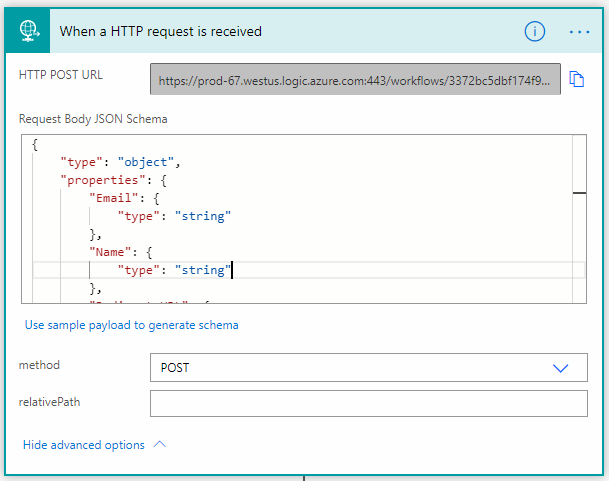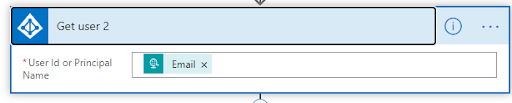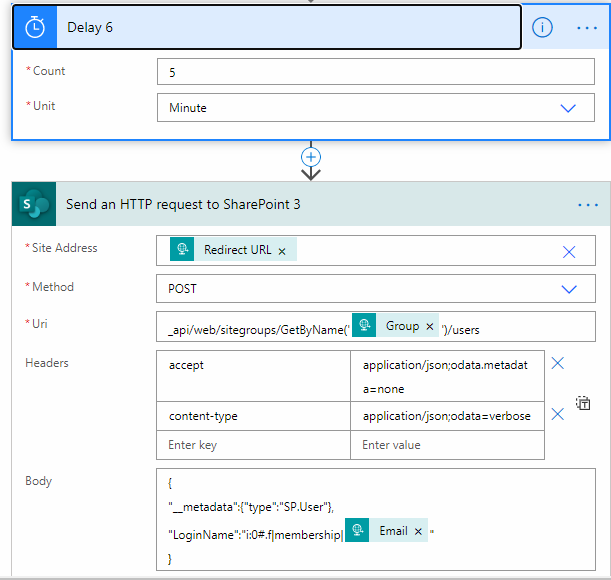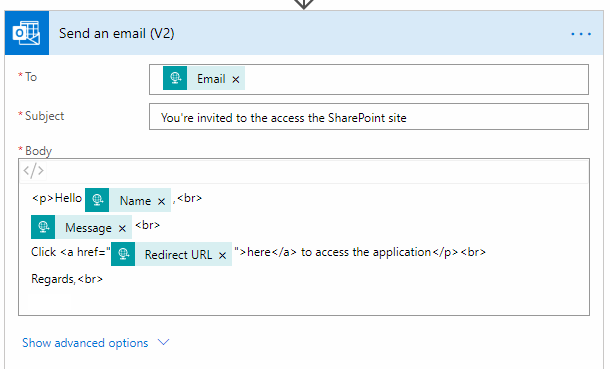
To add any user or to share the site with users, we need to go and share the site with the users manually. It is good until and unless we need to share it with a limited number of users.
But it is not possible to share the site and add the users on the fly.
We can add Active Directory users to the SharePoint group.
This blog will guide you how this can be easily done by using Power Automate in integration with SharePoint and Azure Active directory.
Let’s get started, but first, read what is Microsoft power platform|power automate?
Microsoft power platform is one of the exciting technologies, which can prevent several challenges. The power platform of Microsoft is a collective term for three vital products of Microsoft, and they are:
- Power BI
- Power Apps
- Power automate
Power automation is also known as flow. These products of Microsoft are created to help people manipulate, surface, automate, and analyze data. Along with that, these products are used with office 365 and dynamics 365. And businesses are also using these products with third-party apps and other Microsoft services.
On the other hand, the Microsoft power platform is the strength of the common data service or CDS that renders a unified and simplified data schema to inter-operate applications and services.
If we analyze the importance of the power platform (PP), then it has made many excellent changes in data analysis.
In this digital age, businesses are reliant on data, and the amount of data is increasing day-by-day. Prior to the power platform(PP), IT/Development teams are responsible for data analysis, app creation, or automation. At that time, staff outline their requirements and aims and send them to their IT department, and wait for their approval and corollary. This process was time-consuming and costly. It also takes weeks to render optimal results.
This is why people find the power platform (PP) so exciting and easy-to-implement. MS power platform uses three technologies to enable data democratization and allow businesses to do more with their data, that too, without coding knowledge. Yes, PP does not allow the flexibility of custom coding, and fortunately, Microsoft power platform consultant provides an easy method to create, automate, or analyze data. And the three technologies that the power platform of Microsoft use are:
- Power Apps
- Power Automate
- Power BI
Now, let’s know why we need to create a Power Automate (Flow)?