
The SSIS components for Smartsheet project management tool make it simple to back up Smartsheet data to SQL Server.
Using SQL Server as a backup for crucial corporate data is a must-have safeguard against data loss. By using Smartsheet tool, the data is backed up to SQL Server, it is easier for business users to link it to services like reporting, analytics, and more.
The SSIS package is an ETL (Extract-Convert-Load) processing tool that may be used to not only import data into a database, but also to transform, filter, and group data, among other things.
Inserting data into a database table can be difficult and time-consuming. Especially now, as databases continue to grow in size. Depending on the source file type and data arrangement inside, automated data importation can be done in a variety of ways.
The load Data wizard in SQL Server Management Studio is the simplest way to import data into a SQL database. The user can choose the source file and the destination table to import the data by following the wizard’s stages. However, importing data in this manner restricts the user’s ability to perform more sophisticated activities involving various types of data and several files.
The SSIS packages provide a solution to this type of issue. The SSIS package is an ETL (Extract-Convert-Load) processing tool that may be used to not only import data into a database, but also to transform, filter, and group data, among other things.
Smartsheet Software is a great tool to manage projects and tasks. Many times, user needs to export data from SQL Server and import into Smartsheet. Sometimes it is a regular job to import to smartsheet from SQL server tables.
To reduce the manual work and make it automated, we can use c# Smartsheet SDK and SSIS package.
First create a SSIS package and create a variable of Object type for data table. I have created a variable as dt.

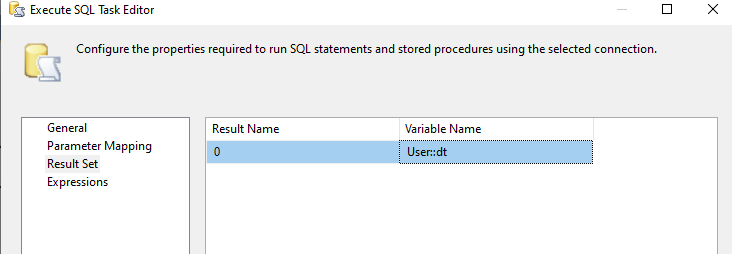
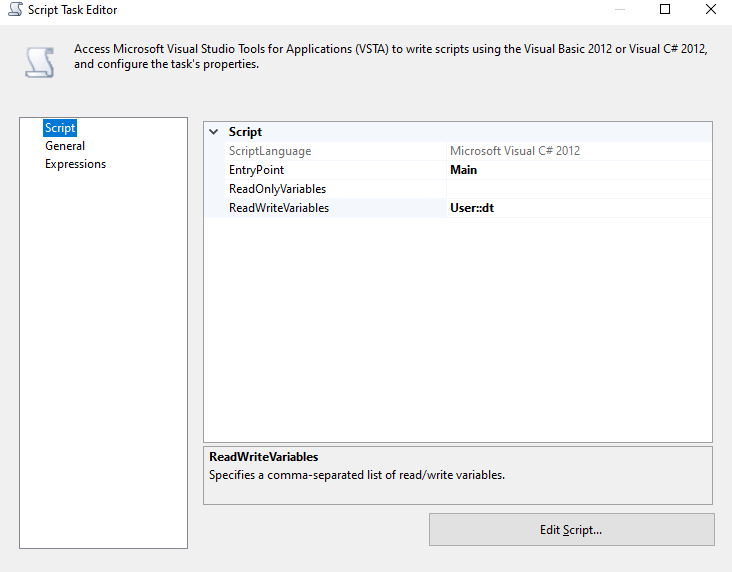
 Now execute the SSIS package. You will see that data will be inserted into the Smartsheet.