This is the Second blog in the series of blogs where we will utilizing the full potential of the GPU hardware resources for developing the AI solutions
We established the foundational knowledge for building a GPU-powered AI system. Now, we shift our focus from the “what” to the “how.” How do we as developers actually command this incredible computational power? How do we translate our Python code into massively parallel tasks executed on thousands of GPU cores?
This time we dives into the developer’s ecosystem, focusing on the roles of CUDA and cuDNN, explaining why Python has become the undisputed language of AI, and providing hands-on code examples to get you started.
The Developer's Gateway: CUDA & cuDNN
While we often credit the GPU hardware, it’s the software that truly unlocks its potential for AI. For NVIDIA GPUs, this software bridge consists of two critical layers: CUDA and cuDNN.
- CUDA (Compute Unified Device Architecture): Think of CUDA as the low-level operating system for the GPU. It’s an API and programming model that extends languages like C/C++ to allow developers to directly control the GPU’s parallel cores. By writing special functions called “kernels,” a developer can instruct the GPU to execute a specific task across thousands of threads simultaneously. This is the bedrock of all GPU computing.
- cuDNN (CUDA Deep Neural Network library): If CUDA is the OS, cuDNN is a highly-specialized, super-optimized math library for deep learning. Instead of writing a complex CUDA kernel for a standard operation like a convolution from scratch, developers can simply call the cuDNN function. NVIDIA’s engineers have spent years perfecting these functions to ensure they are the fastest possible implementations for their hardware.
Why Python Reigns Supreme for GPU Programming
It might seem counterintuitive that a dynamically-typed, interpreted language like Python is the king of a performance-critical field like AI. The reason is simple: Python offers the perfect balance of developer productivity and high-performance execution.
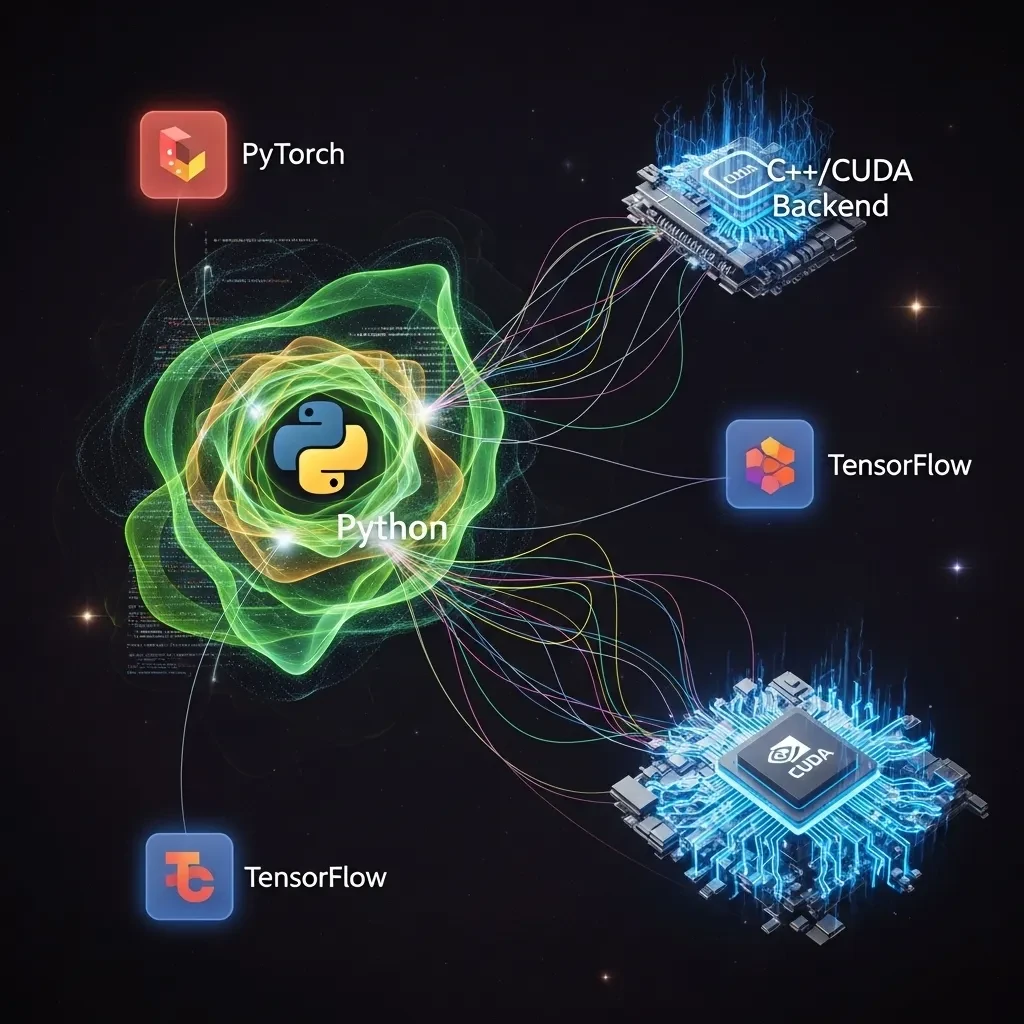
1. High-Level Abstraction: Python frameworks like PyTorch and TensorFlow provide an incredibly simple API to hide the underlying complexity. A single line of Python, model.to(‘cuda’), triggers a cascade of optimized, low-level C++ and CUDA code that moves your entire neural network to the GPU. You get the performance of C++ without having to write it.
2. The “Glue Language” Paradigm: Python’s “slowness” is irrelevant for AI because the computationally intensive tasks (the matrix multiplications, convolutions, etc.) are not run by the Python interpreter. They are executed by the highly-optimized, pre-compiled backends of the frameworks. Python simply acts as the “glue,” orchestrating these high-performance calls.
3. Unbeatable Ecosystem: The AI/ML ecosystem in Python is unparalleled. Libraries for data manipulation (Pandas, NumPy), model sharing (Hugging Face), computer vision (OpenCV), and experimentation are all built around Python, creating a seamless and powerful development experience.
Hands-On: Coding for the GPU with Python
Let’s see how easy it is to harness the GPU in practice. The following examples use PyTorch, but the concepts are nearly identical in TensorFlow.
This visual represents how Python acts as the central coordinator. It connects the user-friendly AI libraries like PyTorch and TensorFlow to the powerful, high-performance C++ and CUDA backend where the real number-crunching happens.
1. The "Hello, World!" of GPU Programming
First, let’s verify we can access the GPU and move data to it.
Python
import torch
# 1. Check if a CUDA-enabled GPU is available
if torch.cuda.is_available():
device = torch.device("cuda")
print(f"GPU is available: {torch.cuda.get_device_name(0)}")
else:
device = torch.device("cpu")
print("GPU not available, using CPU.")
# 2. Create a tensor on the CPU
cpu_tensor = torch.randn(3, 3)
print(f"\nTensor on CPU:\n{cpu_tensor}")
# 3. Move the tensor to the GPU
# The .to() method is the key!
gpu_tensor = cpu_tensor.to(device)
print(f"\nTensor moved to {gpu_tensor.device}:\n{gpu_tensor}")
# 4. Perform an operation on the GPU
# This matrix multiplication happens on the GPU cores
result_tensor = torch.matmul(gpu_tensor, gpu_tensor)
print(f"\nResult of GPU operation:\n{result_tensor}") 2. Accelerating a Real Neural Network
Moving a single tensor is simple, but the real power comes from moving your entire model and all its data to the GPU for training. This is exactly how your object detection model would be accelerated.
Python
import torch
import torch.nn as nn
# Assume 'device' is already defined from the previous code block
# 1. Define a simple CNN model
class SimpleCNN(nn.Module):
def __init__(self):
super(SimpleCNN, self).__init__()
self.conv1 = nn.Conv2d(1, 16, kernel_size=3, stride=1, padding=1)
self.relu = nn.ReLU()
self.pool = nn.MaxPool2d(kernel_size=2, stride=2)
self.fc1 = nn.Linear(16 * 14 * 14, 10) # For 28x28 input images
def forward(self, x):
x = self.pool(self.relu(self.conv1(x)))
x = x.view(-1, 16 * 14 * 14) # Flatten the tensor
x = self.fc1(x)
return x
# 2. Instantiate the model and move it to the GPU
model = SimpleCNN()
model.to(device)
print(f"Model moved to: {next(model.parameters()).device}")
# 3. Create some dummy data for a training loop
# In a real scenario, this comes from your DataLoader
batch_size = 64
dummy_images = torch.randn(batch_size, 1, 28, 28)
dummy_labels = torch.randint(0, 10, (batch_size,))
# 4. The core of the training loop: Move DATA to the GPU
# This must be done for every batch!
gpu_images = dummy_images.to(device)
gpu_labels = dummy_labels.to(device)
# The forward pass, loss calculation, and backpropagation
# all happen seamlessly on the GPU.
optimizer = torch.optim.Adam(model.parameters(), lr=0.001)
criterion = nn.CrossEntropyLoss()
optimizer.zero_grad()
outputs = model(gpu_images) # Forward pass on GPU
loss = criterion(outputs, gpu_labels) # Loss calculation on GPU
loss.backward() # Backpropagation on GPU
optimizer.step()
print(f"\nSuccessfully completed a training step on the {device} device.") Powering Advanced Models: LLMs and AI Agents
The same principles apply to today’s most advanced models, where GPU acceleration is not just helpful but absolutely essential.
Large Language Models (LLMs)
LLMs have billions of parameters, making them incredibly demanding on memory (VRAM) and compute. Running them requires a GPU.
Python
from transformers import AutoTokenizer, AutoModelForCausalLM
# 1. Load a pre-trained model and tokenizer
# We use quantization (load_in_4bit) to fit larger models onto consumer GPUs
model_name = "mistralai/Mistral-7B-Instruct-v0.2"
tokenizer = AutoTokenizer.from_pretrained(model_name)
model = AutoModelForCausalLM.from_pretrained(
model_name,
load_in_4bit=True, # Drastically reduces memory usage
device_map="auto" # Automatically uses the GPU if available
)
# 2. Perform inference
# The tokenizer prepares the data on the CPU, but the model.generate() call
# runs the massive computation on the GPU.
prompt = "The role of a GPU in an AI Agent is to"
inputs = tokenizer(prompt, return_tensors="pt").to(device)
outputs = model.generate(**inputs, max_new_tokens=50)
print("\n--- LLM Output ---")
print(tokenizer.decode(outputs[0], skip_special_tokens=True)) AI Agents
An AI Agent combines models to perceive, reason, and act. The GPU is the central hub that enables this loop to run in real time. For example, an agent might combine your YOLOv8 detection model with an LLM for decision-making.
Python
# --- Conceptual Code for an AI Agent ---
# 1. Load all necessary models onto the GPU
vision_model = YourYOLOv8Model().to(device) # For perception
llm_model = YourLLMModel().to(device) # For reasoning
def agent_loop(video_frame):
# 2. Perception (GPU-accelerated)
# The vision model processes the raw pixels on the GPU
detections = vision_model(video_frame.to(device))
# 3. Reasoning (GPU-accelerated)
# Create a prompt for the LLM based on what the vision model saw
prompt = f"I see the following objects: {detections}. What should I do next?"
action = llm_model.generate(prompt)
# 4. Action (CPU)
# The agent executes the action decided by the LLM
execute_action(action)
print("\n--- AI Agent Concept ---")
print("Agent is ready: Perception and Reasoning models are loaded on the GPU.") Conclusion
The modern AI development stack is a masterpiece of layered abstraction. At the bottom, CUDA provides raw access to the immense power of the GPU. Layered on top, cuDNN offers optimized deep learning primitives. But for most of us, the entry point is Python—a language that provides a simple, elegant interface to this entire ecosystem.
By understanding how these layers interact, you’re not just a user of a framework; you’re a developer who can reason about performance, debug bottlenecks, and truly harness the hardware that drives the entire AI revolution, from simple classifiers to sophisticated, reasoning agents.